
Performance Marketing · Attribution & Measurement
AI Search Attribution Is Breaking: Why ChatGPT Ads and AI Overviews Are Wrecking Your Reports
Your GA4 dashboard says traffic is flat. Your leads say otherwise. Here's where AI search attribution is actually going and six ways to fix it.
Rithin P V · Performance Marketer, Kochi · 9 min read
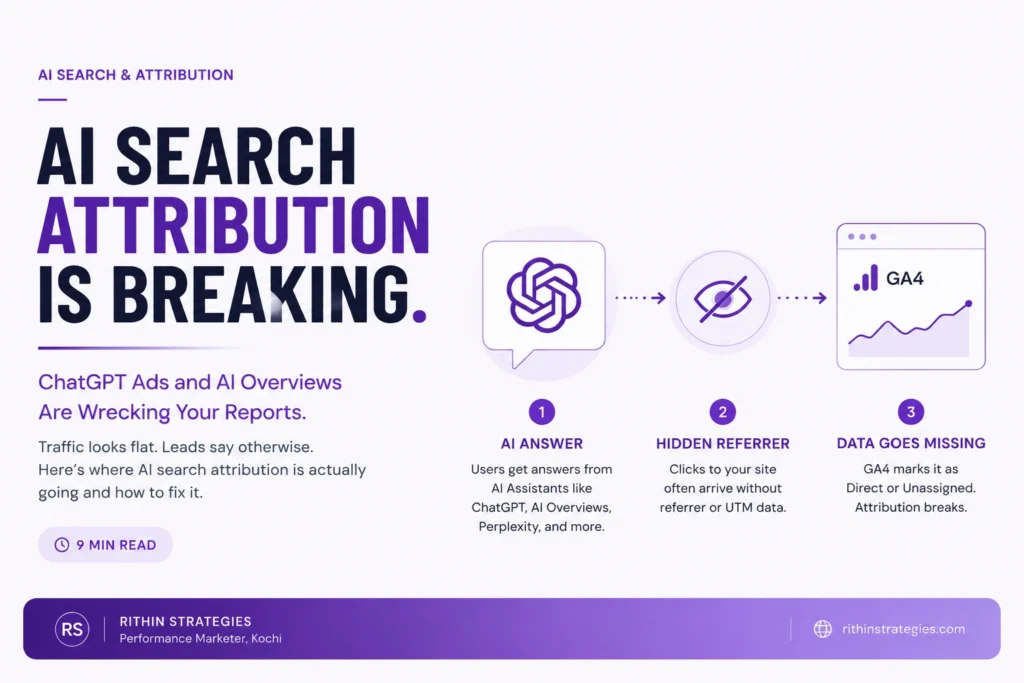
A client messaged me last month convinced their ad account was broken. Leads were coming in steady, sometimes faster than usual, but GA4 showed almost no source for them. No campaign, no referrer, just "Direct" and "Unassigned" piling up in the reports. Nothing was broken. What they were looking at was AI search attribution quietly falling apart because ChatGPT ads, AI Overviews, and tools like Perplexity and Copilot don't hand off the clean referral data that Google Analytics was built around. If you're running paid or organic campaigns in 2026, this isn't a future problem. It's already sitting in your reports today, disguised as a data quality issue instead of what it actually is: a structural shift in how people research and click.
What Actually Changed in AI Search Attribution
Attribution has always meant tracing a sale back to the marketing that caused it. That job got harder every year as journeys spread across more devices and channels, but the basic mechanics stayed the same: a click carried a referrer, a UTM tag, or a click ID, and your analytics tool used that string to assign credit.
AI search breaks that mechanic at the source. When someone asks ChatGPT to compare CRM tools, or asks Google’s AI Overview to summarize the best accounting software for a small business, the answer gets generated and shown right there. If the user clicks through to your site from that answer, the click often arrives stripped of the referral data your analytics setup expects. Google Analytics has nowhere to put it, so it defaults to “Direct” or “Unassigned,” the two buckets that tell you almost nothing about what actually influenced the visit.
Layer paid ads on top of that. ChatGPT rolled out its own advertising surface in 2025, and Google’s AI Mode is carrying ads inside AI-generated answers rather than beside them. Both are genuinely new inventory, and neither passes data through your ad platform’s conversion tracking the way a normal Google Search or Meta ad does. You’re spending in a channel your existing attribution model was never built to see.
Why ChatGPT Ads and AI Overviews Are Breaking Your Attribution Model
The dark traffic problem
Marketers call this “dark traffic,” and it’s not new, exactly, it’s just gotten much bigger. Dark traffic is any visit your analytics can’t confidently trace to a source: app-based browsers, copied-and-pasted links, and now AI-generated answers. A visitor who reads a ChatGPT summary, opens your site in a new tab, and buys three days later shows up in GA4 as a cold, sourceless conversion. The AI conversation that actually drove the decision never gets credit.
WHY THIS MATTERS
If AI-influenced visits keep landing in “Direct,” your reports will make organic and paid AI search look like it’s doing nothing, right up until you cut the content or campaign feeding it and your direct traffic drops with it.
ChatGPT ads don't pass referral data the way you expect
ChatGPT’s ad units sit inside a conversational answer, not a results page, so there’s no guarantee the click carries a standard UTM string unless you’ve built the landing page to expect one. I’ve seen agencies assume their existing Google Ads tracking template would “just work” on ChatGPT campaigns. It doesn’t, not without manually appending parameters and testing that they survive the click.
Zero-click answers are eating your top-of-funnel data
A lot of AI search traffic never becomes traffic at all. The person gets their answer inside ChatGPT or the AI Overview and never visits your site, even though your content or your brand shaped the answer they read. That’s real influence with zero footprint in any analytics tool, which is why relying on click-based attribution alone will systematically undercount everything AI search is doing for you
How to find AI Search traffic in your GA4 reports
Before fixing anything, confirm how much of your “Direct” and “Unassigned” traffic is actually AI-influenced. Three checks catch most of it:
|
Where to look
|
What you're checking for
|
|---|---|
None of this proves a visit came from ChatGPT specifically, but a pattern of direct traffic hitting deep, narrow pages with decent engagement time is a strong signal that an AI assistant sent them there, not that they typed your URL from memory.
6 Fixes: How to Rebuild Attribution for the AI Search Era
None of these fixes bring back perfect, click-level attribution. That version of measurement is fading everywhere, not just in AI search. What they do is give you enough signal to make real budget decisions instead of guessing.
1. Tag everything, including links that feel unnecessary
Put UTM parameters on every outbound link you control: newsletter mentions, PR placements, ChatGPT ad landing pages, even links in downloadable PDFs. You can’t tag a link inside an AI assistant’s generated answer, but you can make sure every link you do control leaves a trail, so what’s left unattributed shrinks.
2. Move critical conversions to server-side tracking
Browser-based tracking is the first thing AI assistants, privacy browsers, and iOS strip out. Server-side tagging and conversion APIs (Meta CAPI, Google Enhanced Conversions) send conversion data directly from your server, which survives a lot of what client-side pixels lose.
3. Track branded search as a proxy metric
If your ChatGPT visibility or AI Overview presence is working, branded search volume tends to rise even when you can’t trace the individual clicks. Watch it monthly in Search Console alongside your Direct traffic. A rising line in both, together, is a reasonable stand-in for “AI search is working” even without touchpoint-level proof.
4. Run a small incrementality test
Pause your ChatGPT ads or a content initiative for two to four weeks in one region or segment while holding everything else steady, then compare direct traffic and conversions against a control period. This is the most honest way to measure a channel that won’t hand you clean attribution data on its own.
5. Add a lightweight marketing mix view
A data science team isn’t necessary for this. A monthly spreadsheet tracking total spend by channel against total revenue, reviewed for trend and correlation, catches shifts that campaign-level attribution misses entirely, especially when a channel’s real job is influence rather than the last click.
6. Just ask
Include one “How did you find out about us?” question in your lead form or checkout process. It’s unglamorous, but a free-text or dropdown answer that includes “ChatGPT,” “AI search,” or “an AI recommendation” is often more reliable than anything your analytics stack will surface on its own.
FAQ
Why doesn't ChatGPT traffic show up properly in Google Analytics?
Because the click often arrives without a standard referrer or UTM string attached, so GA4 has no data to classify it and defaults to “Direct” or “Unassigned” instead of naming the actual source.
Can you actually run ads on ChatGPT?
Yes. ChatGPT introduced advertising placements inside its answers in 2025, and Google’s AI Mode now carries ads within AI-generated responses too. Both are new enough that most advertisers’ existing tracking setups weren’t built with them in mind.
Is AI search traffic counted as direct traffic in GA4?
Often, yes. When a click loses its referral data on the way from an AI assistant to your site, GA4 has no way to distinguish it from someone typing your URL in from memory, so both land in the same “Direct” bucket.
What is dark traffic in marketing?
Dark traffic is any website visit your analytics tool can’t confidently trace back to a source, whether it comes from a copied link, an app-based browser, or an AI-generated answer. It’s counted, but it’s effectively unattributed.
How do I measure ROI from AI search if I can't track individual clicks?
Combine proxy signals instead of chasing a single number: branded search growth, a short incrementality test, and a simple spend-versus-revenue view over time. Together they’ll tell you whether AI search is paying off even without a clean, click-level report.
Not sure how much of your traffic AI search
is actually influencing?
I audit accounts for exactly this kind of blind spot, then build a measurement setup that holds up as AI search keeps growing. Let’s take a look at yours.